Anakin and Padme
Generate the viral Anakin and Padme 'For the better, right?' meme instantly. Use our AI tools to add custom dialogue to this iconic Star Wars four-panel template for free.
Anakin and Padme
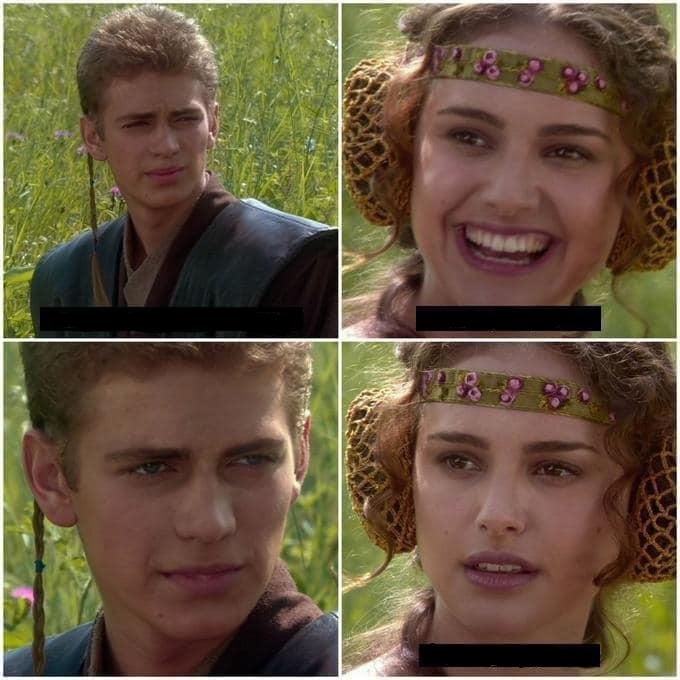
Anakin and Padme
Edit Post
Frequently Asked Questions
What is the origin of the Anakin and Padme meme?
The Anakin and Padme meme, also known as the 'For the better, right?' meme, originates from a scene in the 2002 film Star Wars: Episode II – Attack of the Clones. The format typically features four panels depicting a conversation between Anakin Skywalker and Padme Amidala in a meadow on Naboo. It began trending in mid-2021 as a way to illustrate situations where an initial optimistic statement is misinterpreted or masks a darker, more sinister truth. The humor lies in Padme’s increasingly concerned facial expression when Anakin remains silent instead of confirming her hopeful assumptions, making it a staple for political, tech, and social commentary.
Is there any cost to use this meme maker?
No payment needed. The meme generator is free for everyone.
How do I get AI-generated Anakin and Padme text?
Our AI is trained on viral content. to get free credits and start creating Anakin and Padme text that works.
Is it possible to customize the meme image?
Custom photos work great. Upload your image and apply the same meme format.
Do I need to sign up to make Anakin and Padme?
No registration required. Just open the tool and start creating.
Can I use Anakin and Padme in marketing?
Commercial use is allowed. Create meme content for your brand, just respect image copyrights.
What sets this meme generator apart?
The AI actually understands meme culture, plus there is analytics and easy sharing. Discover more Post2x features.
How to export my Anakin and Padme creation?
Hit the download button to save the meme. It exports as a PNG image file.
Can I post Anakin and Padme to X directly?
Yes! Share your Anakin and Padme directly to X and other platforms with one click.
Is there a no-watermark option for this meme?
Pro members get watermark-free downloads. Perfect for professional use and social media posting.