Photoshop Me Into a Dangerous Situation
Ready to risk it all for a laugh? Use the Photoshop Me Into a Dangerous Situation meme maker on Post2x to create your own hilarious 'be careful what you wish for' edits. Our fast and free tools make it easy to craft the perfect viral image.
Photoshop Me Into a Dangerous Situation
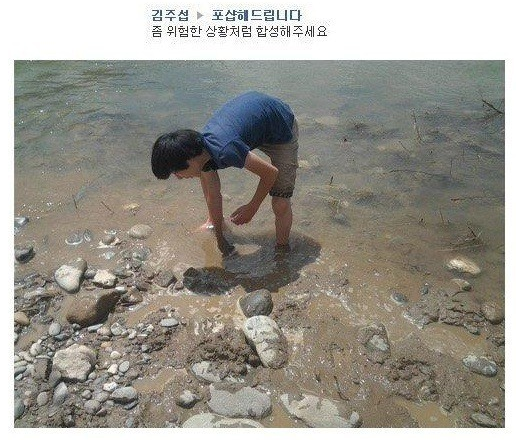
Photoshop Me Into a Dangerous Situation
Edit Post
Frequently Asked Questions
Where did the Photoshop Me Into a Dangerous Situation meme come from?
The 'Photoshop Me Into a Dangerous Situation' meme format stems from the long-standing internet tradition of users asking for free photo editing help, only to be hilariously trolled by the community. Usually starting with a mundane or posing photo, the subject requests to be placed in a high-stakes or life-threatening scenario, such as a shark attack, an explosion, or a skydiving accident. However, the 'danger' often results in ironic twists—like being near a wet floor sign or standing in front of an angry mother. It highlights the playful relationship between digital artists and those seeking social media clout, serving as a cautionary tale about the internet's unique sense of humor.
Is the Photoshop Me Into a Dangerous Situation tool free to use?
Zero cost. Make unlimited memes without paying anything.
Does this meme maker have AI writing?
Our AI is trained on viral content. to get free credits and start creating Photoshop Me Into a Dangerous Situation text that works.
Is it possible to customize the meme image?
Definitely. You can use your own images with Photoshop Me Into a Dangerous Situation and customize however you want.
Can I use the Photoshop Me Into a Dangerous Situation generator without registering?
Nope! Use the meme maker right away. Signing up is optional and unlocks extra features.
Can businesses use this meme maker?
Businesses can freely use Photoshop Me Into a Dangerous Situation. Make sure uploaded images are legally yours.
What makes this Photoshop Me Into a Dangerous Situation generator different?
AI-powered captions, instant downloads, and social posting make the Photoshop Me Into a Dangerous Situation generator stand out. See what else Post2x offers.
How to export my Photoshop Me Into a Dangerous Situation creation?
Click "Download" and your Photoshop Me Into a Dangerous Situation saves as a high-quality PNG. Share it anywhere.
Can I post Photoshop Me Into a Dangerous Situation to X directly?
Post your Photoshop Me Into a Dangerous Situation to X instantly. No need to download first if you prefer.
Can I remove the watermark from Photoshop Me Into a Dangerous Situation?
Upgrade to Pro and all your Photoshop Me Into a Dangerous Situation downloads come without watermarks. Great for creators and brands.